
Personal Health Records & Patient Portals.

Health care is a massive system with thousands of doctors and other health care professionals. Not every doctor treats the same thing, and some are much more skilled in the area than others. Because of this, multiple doctors are seen for various reasons by individuals. These different visits can be hard on the patient and physician because the patient is asked to recall all events of their health each time, and it becomes a massive game of telephone. If you have not heard of this, the telephone game is where someone whispers a message into another persons ear and that message is passed on and on. When the message reaches its final destination, it is not the same as it was when it began. With electronic health records, this will soon become a thing of the past.

Electronic health records allow the patient and physician to track everything they do together, and this information can be accessed by other doctors that the patient may go to. In this way, better communication is made between the different doctors and a more accurate health history is maintained, which leads to better care and better patient outcomes. The Personal health record varies in that the information in the PHR is managed and entered by the patient. The individual owns and manages this information in the record, and may have access to it at anytime. The individual is then responsible for anyone who accesses this information. Access to the PHR allows patients to see lab results, prescribed medication lists, pathology reports, appointments, diagnoses, health insurance information, and more. This ensures people better understand their care and have access to the needed information whenever they need. It also is beneficial to health care providers who use different software than the individuals main health care provider so that they can share this information with the doctor if needed.

Although this information does provide more power to the patients, many may find it hard to navigate, access, or even hard to enter and maintain their information in the record. Securing the information can also be challenging for those who are uneducated about technology as well. A few tips are to avoid accessing information on public computers with unsecured Internet, never share passwords with anyone or write them down where someone may find them, and if using mobile devices, ensure your device has a passcode and you always lock the screen when not in use. These are very simple things the patient can do to protect their information. While some people still lack the knowledge of technology, the use of PHR are vast and will help patients be in more control over their health care, increase their health knowledge, support healthy activities, increase health care access, and strengthen health promotion and disease prevention.

References

Alexander, S., Frith, K. H., & Hoy, H. (2019). Applied Clinical Informatics for Nurses (2nd ed.). Burlington, Massachusetts: Jones and Bartlett Learning.

Computer Basics

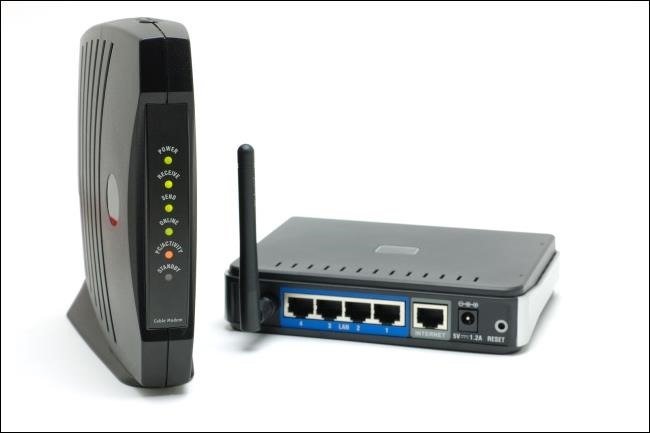
If your new to technology, you may have heard a few terms that you do not understand. Lets cover a few of these terms right now. The Internet service provider, or ISP, is the company that provides cables, wires, and satellite connections to your home or business that access the internet. This network is connected to a central device in the home known as the modem. The router is another device that connects to the modem directly and enables you to split that network with other devices in your home either with cables or with with a built in radio known as WiFi.

Most devices now are combined so you will only need 1 modem/router device, which has multiple ports/plugs in the back to connect other devices with. One way to think of this is your ISP is your farmers growing corn, where the corn is the internet. When you buy the corn and place it on the counter, that is the modem you have in your home. When you cook the corn and put a piece on each plate at the table for your family, that is router dividing the signal to other devices in the household.

References

Alexander, S., Frith, K. H., & Hoy, H. (2019). Applied Clinical Informatics for Nurses (2nd ed.). Burlington, Massachusetts: Jones and Bartlett Learning.

Hoffman, C. (n.d.). What’s the Difference Between a Modem and a Router? Retrieved March 24, 2019, from https://www.howtogeek.com/234233/whats-the-difference-between-a-modem-and-a-router/

Virtual Support groups

Dealing with a new illness, a family member with a new illness or disability, or even suffering from an addiction or feeling that you are alone in an unforgiving situation, is not uncommon. Many people are going through similar situations, or even worse situations. Support groups are safe spaces that people can attend, to talk through these difficult situations and find additional strength to manage or get through the problem. Many of these groups are not available in certain areas, are too far away, or there is some other factor that prevents people from attending this much needed experience. With technology however, this has been fixed.

Social media, blogs, smartphone apps, web chat rooms, and discussion boards have all opened the door to a new way of communicating with other people. Because of this there is continuous availability of support groups which can be accessed at any time. Not all these groups require video, which gives the individual more privacy and the option to remain anonymous. Traveling is also not an issue, which makes it more cost efficient and increases attendance to promote quality of the experience. Accessing these means of communication with usernames instead of real names and using secured network at home, are all great ways to maintain confidentiality as well.

Some support groups I have discovered are as follows:

Alpha-1 Virtual Support Groups (contains 4 groups for those who are parents of a child diagnosed with alpha-1 liver disease, caregiver of someone with it, pre and post liver transplant, and everyone in the community)

Depression and Bipolar Support Alliance – Group for those suffering from depression or Bipolar disorder, and also for family and friends of people suffering from it.

ADDA– Group for people affected with ADHD and those who know someone with ADHD to better understand the disease. 3 different groups available.

Online Intergroup: Alcoholics Anonymous– Online forums and other formats for those suffering with an alcohol addiction, and those suffering from one such as family of the addicted.

References

6 major benefits of online support groups. (2017, August 2). Retrieved from https://www.nuemd.com/news/2017/08/02/6-major-benefits-online-support-groups

Mobile Health Apps

With the increase of technology such as smartphones, smart watches, wearable devices, tablets, and more, access to health care has never been easier. People use their devices for everything, which has gained the interest of the medical field as well. We can now track heart rates, blood pressures, sleep activity, calories burned, steps walked, blood sugar levels, and more all through applications on the devices we already have. Mobile health applications have multiple benefits for people. One of these are the increased access to your healthcare. By providing easier ways for people to manage their health in a cost efficient way, people are more likely to follow through with their care plans. Applications can also help encourage patients to live healthier lifestyles by allowing them to track their habits such as exercise, caloric intake, and more. Having that immediate feedback as well can help patients communicate with doctors to be more involved in their care. Your health care provider may have applications they recommend, but you can also choose applications based on our preference or other users reviews.

Having all your health information easily accessible online is a great benefit for the future, but online can also be dangerous and nobody wants their information taken. This is one of the main concerns with the world of health going technological. If using mobile health applications on your electronic devices, there are a few things to know to help keep your information safe. Be sure your phone has a passcode that only you know, and is never left unlocked. You should also avoid having your password written down for someone to find. Accessing information in public areas or using open and unsecured WiFi networks is also not recommended. Many people stay logged into applications on devices for ease of access, however is not recommended. Fortunately, the apps themselves must abide by strict rules to provide privacy and confidentiality support on all levels of the systems.

Here is a lost of some mobile health applications:

BodyGuardian www.preventicesolutions.com

AliveCor www.store.alivecor.com

Diabetes Manager by WellDoc www.welldoc.com

Youper www.youper.ai

References

Alexander, S., Frith, K. H., & Hoy, H. (2019). Applied Clinical Informatics for Nurses (2nd ed.). Burlington, Massachusetts: Jones and Bartlett Learning.
Arora, S., Yttri, J., & Nilsen, W. (2014). Privacy and Security in Mobile Health (mHealth) Research. Alcohol Research : Current Reviews, 36(1), 143–151.

Health Websites, Reliable or Not?

With the ever increasing body of technology at our finger tips, accessing information is easier than ever before. We can turn to sites like YouTube to watch funny videos for entertainment, or even to learn new skills from how to videos. Keeping in touch with friends and family through social media apps and websites is also a new way to stay connected. The use of technology in the health care system is also advancing, and we can look up medications, research diseases, treatment options, and even try to self diagnose your symptoms. In 2010 a survey showed that the in the United States, 75% of adults use the Internet, and more than 50% of those used it to look up health related information. With everyone relying on information they find, how can we be sure the information is accurate.

When looking at websites, it is important to assess its credibility before relying on the information they present. One way to do this is to check with your Health care provider as they may have already assessed some quality websites for their patients that they trust. If this is not an option however, assessing the website yourself can also be done. There are 5 C’s to look for when assessing a website, which include: Credibility, Currency, Content, Construction, and Clarity. Credibility refers to the person or organization who created the site, more specifically, what are their qualifications to telling you the information. Currency means to check the date the information was last updated to ensure its up to date. Content relates to ensuring the information on the site is relevant to what you are looking for. Construction is how well the site is created and organization of the information. Last but not least, Clarity is how well the information is presented and if it is easily understood.

Websites ending in .gov, .edu, or .org are usually good sources of information, but here is a list of websites that I have found:

Mayo Clinic www.mayoclinic.org

Centers for Disease Control and Prevention www.CDC.gov

National Cancer Institute www.cancer.gov

Medline Plus www.medlineplus.gov

Centers for Medicare & Medicaid Services www.cms.gov

Kids Health www.kidshealth.org

References

Alexander, S., Frith, K. H., & Hoy, H. (2019). Applied Clinical Informatics for Nurses (2nd ed.). Burlington, Massachusetts: Jones and Bartlett Learning.